안드로이드 자바
[JAVA][Android] CustomTextWatcher 사용해서 컴마, 원화 표시하기
teamnova
2024. 8. 10. 12:00
728x90
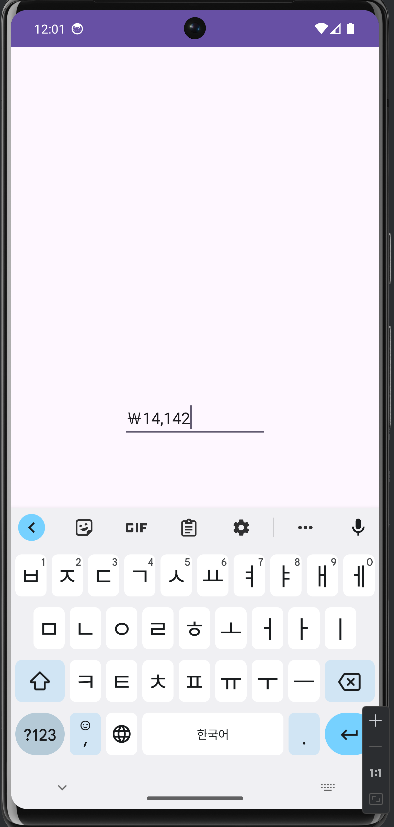
안드로이드 텍스트에서 숫자에 컴마, 원화를 표시해 보겠습니다
<?xml version="1.0" encoding="utf-8"?>
<androidx.constraintlayout.widget.ConstraintLayout xmlns:android="http://schemas.android.com/apk/res/android"
    xmlns:app="http://schemas.android.com/apk/res-auto"
    xmlns:tools="http://schemas.android.com/tools"
    android:layout_width="match_parent"
    android:layout_height="match_parent"
    tools:context=".MainActivity">

    <EditText
        android:layout_width="wrap_content"
        android:layout_height="wrap_content"
        android:id="@+id/textTest"
        android:hint="텍스트를 입력하세요"
        app:layout_constraintBottom_toBottomOf="parent"
        app:layout_constraintEnd_toEndOf="parent"
        app:layout_constraintStart_toStartOf="parent"
        app:layout_constraintTop_toTopOf="parent" />

</androidx.constraintlayout.widget.ConstraintLayout>
import androidx.appcompat.app.AppCompatActivity;

import android.os.Bundle;
import android.widget.EditText;

public class MainActivity extends AppCompatActivity {

    EditText editText;
    @Override
    protected void onCreate(Bundle savedInstanceState) {
        super.onCreate(savedInstanceState);
        setContentView(R.layout.activity_main);
        editText = findViewById(R.id.textTest);
        editText.addTextChangedListener(new CustomTextWatcher(editText));

    }
}
import android.text.Editable;
import android.text.Selection;
import android.text.TextUtils;
import android.text.TextWatcher;
import android.util.Log;
import android.widget.EditText;

import java.text.DecimalFormat;

public class CustomTextWatcher implements TextWatcher {

    EditText editText;
    String strAmount = "";
    String TAG ="CustomTextWatcher";

    CustomTextWatcher(EditText et) {
        editText = et;
    }

    @Override
    public void beforeTextChanged(CharSequence s, int start, int count, int after) {
        // No action needed before text changes
    }

    @Override
    public void onTextChanged(CharSequence s, int start, int before, int count) {
        if (!TextUtils.isEmpty(s.toString()) && !s.toString().equals(strAmount)) {
            strAmount = makeStringComma(s.toString().replace(",", "").replace("₩", ""));
            editText.setText(strAmount);
            Editable editable = editText.getText();
            Selection.setSelection(editable, strAmount.length());
        }
    }

    @Override
    public void afterTextChanged(Editable s) {
        // No action needed after text changes
    }

    protected String makeStringComma(String str) {
        // 천단위 콤마 설정 및 원화 기호 추가
        if (str.length() == 0) {
            return "";
        }

        try {
            long value = Long.parseLong(str);
            DecimalFormat format = new DecimalFormat("###,###");
            return "₩" + format.format(value);
        } catch (NumberFormatException e) {
            // 입력 문자열이 숫자로 변환할 수 없는 경우 빈 문자열 반환
            Log.i(TAG, "makeStringComma: 숫자만 입력할 수 있습니다!!!");
            return "";
        }
    }
}
시연화면