JavaScript
[JavaScript] CoinGecko API를 사용하여 현재 특정 가상화폐의 KRW 가격을 조회하여 나타내기
teamnova
2024. 3. 10. 12:00
728x90
안녕하세요 오늘은 CoinGecko API를 사용하여 현재 특정 가상화폐의 KRW 가격을 조회하는 기능을 구현해보도록 하겠습니다.
index.html 파일에 다음과 같이 코드를 작성해줍니다.
<!DOCTYPE html>
<html lang="en">
<head>
    <!-- 기본 HTML 헤드 설정 -->
    <meta charset="UTF-8">
    <meta name="viewport" content="width=device-width, initial-scale=1.0">
    <title>Crypto Price Checker</title>
    <!-- Tailwind CSS 연결 -->
    <script src="https://cdn.tailwindcss.com"></script>
    <!-- JavaScript 파일 연결 -->
    <script defer src="script.js"></script>
</head>
<body class="bg-gray-100 flex justify-center items-center h-screen">
    <!-- 컨테이너: 모든 내용을 가운데 정렬 -->
    <div class="container">
        <h1 class="text-xl font-bold mb-4">Crypto Price Checker</h1>
        <!-- 드롭다운 메뉴: 가상 화폐 선택 -->
        <select id="crypto-select" class="border p-2 rounded">
            <option value="bitcoin">Bitcoin</option>
            <option value="ethereum">Ethereum</option>
            <option value="near">NEAR</option>
        </select>
        <!-- 가격 확인 버튼 -->
        <button id="check-price" class="bg-blue-500 hover:bg-blue-700 text-white font-bold py-2 px-4 rounded ml-2">
            Check Price
        </button>
        <!-- 가격 표시 영역 -->
        <div id="price-display" class="mt-4"></div>
    </div>
</body>
</html>
script.js 에 다음과 같이 코드를 작성해줍니다.
// 'Check Price' 버튼에 클릭 이벤트 리스너 추가
document.getElementById('check-price').addEventListener('click', async () => {
  // 선택된 가상 화폐를 가져옴
  const cryptoCurrency = document.getElementById('crypto-select').value;
  // 가격 표시 영역 찾기
  const priceDisplay = document.getElementById('price-display');

  try {
    // CoinGecko API를 사용하여 선택된 가상 화폐의 KRW 가격 조회
    const response = await fetch(
      `https://api.coingecko.com/api/v3/simple/price?ids=${cryptoCurrency}&vs_currencies=krw`
    );
    const data = await response.json();
    const price = data[cryptoCurrency].krw;
    // 결과를 화면에 표시
    priceDisplay.textContent = `The current price of ${cryptoCurrency} is: ${price} KRW`;
  } catch (error) {
    // 에러 처리: 콘솔에 에러 로그를 출력하고 사용자에게 실패 메시지 표시
    console.error('Error fetching the coin price:', error);
    priceDisplay.textContent = 'Failed to retrieve price. Please try again.';
  }
});
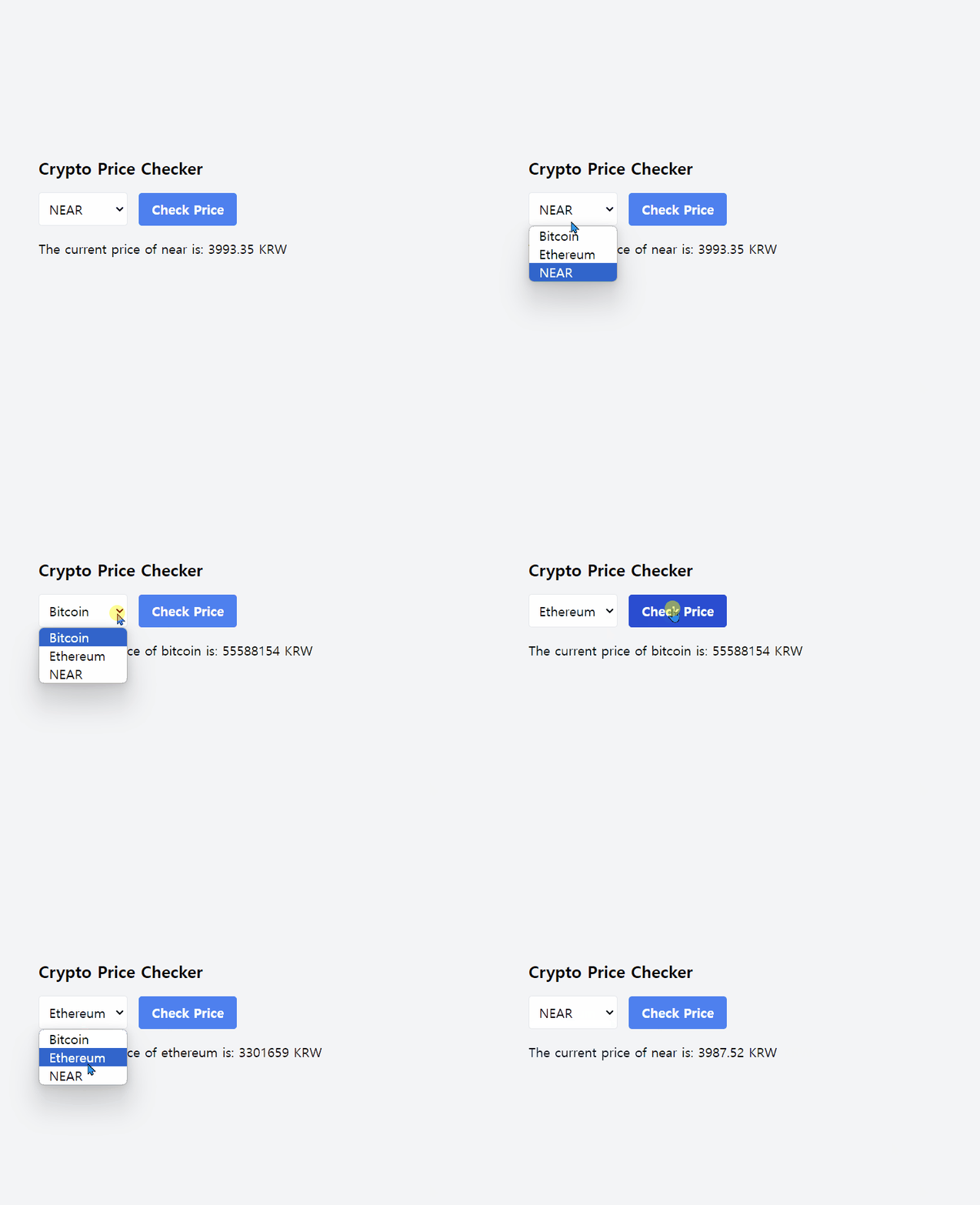
위와 같이 코드를 작성하면
다음과 같은 결과를 얻을 수 있습니다.